Outlook Profile Autodiscover and SCP for Office 365 Migrations
When you install the Client Access server role on a computer running Exchange 2010 a default virtual directory named Autodiscover is created under th...

When you install the Client Access server role on a computer running Exchange 2010, a default virtual directory named Autodiscover is created under the default Web site in Internet Information Services (IIS). This virtual directory handles Autodiscover service requests from Outlook 2007 or Outlook 2010 clients and supported mobile phones under the following circumstances:
- When a new user account is configured or updated
- When an Outlook client periodically checks for changes to the Exchange Web Services URLs
- When underlying network connection changes occur in your Exchange messaging environment
Additionally, a new Active Directory object named the service connection point (SCP) is created on the server where you install the Client Access server role. The SCP object contains the authoritative list of Autodiscover service URLs for the forest. You can use the Set-ClientAccessServer cmdlet to update the SCP object. For more information, see Set-ClientAccessServer. For more information about SCP objects, see Publishing with Service Connection Points.
The following figure shows how a client connects to a Client Access server the first time from inside the internal network. For external access, or using DNS, the client locates the Autodiscover service on the Internet by using the primary SMTP domain address from the user’s e-mail address.
The Autodiscover service process for internal access 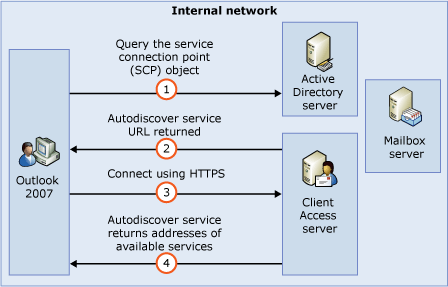
If the SCP is not available, the client looks for a valid SSL certificate typically a CNAME record for autodiscover.outlook.com for Office 365
The Autodiscover service process for external access
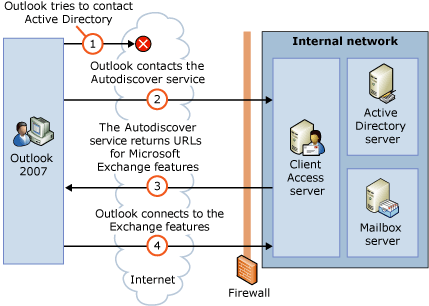
To Disable SCP, on a forest that is migrating to hosted exchange or Office 365, and you’re NOT using the Microsoft Online Migrations Tool(web based Office 365 tool), you may need to disable the SCP in your Active Directory by running the following command in the Echange Server Management Shell:
Set-ClientAccessServer -Identity “SERVERNAME” -AutoDiscoverServiceInternalUri $NULL
If you have multiple Exchange servers, You may need to run this replacing SERVERNAME with all the Exchange servers in the directory. If you don’t have access to the Exchange server, and it was not uninstalled properly, you can delete the SCP entries using ADSIEdit in the following container: CN=Autodiscover,CN=Microsoft Exchange,CN=Services, [Configuration Naming Context].